


Minifig Scan
4.8659.00 Reviews
App Specs
- Version
- 5.0.3
- Updated On
- License
- Free
- Downloads
- 1,000,000+
- Developer
- PacoLabs
- Categories
- Shopping
- Platform
- Android
Screenshots

 Analysis by AppCompare
When I’m deciding whether a collector’s app is worth keeping, I look for one practical thing first: does it make a fiddly job easier without turning the hobby into paperwork? With minifigures, the awkward part is often identification. A pile of small figures can be hard to sort by memory, especially when pieces have been mixed together over time. Minifig Scan is built around that specific problem, so it makes the most sense when you want help recognizing figures rather than a general-purpose shopping app.
Start with the job you want done
Before relying on a scanner, I’d decide what “organized” means for you. If you only want to identify a handful of figures, scanning and looking up a result may be enough. If you’re sorting a larger collection, the more useful question is whether you’ll also maintain a record of what you own and what you still want. That second habit takes a little effort, but it can save time later when you’re comparing a new find with figures already in your collection.
A good way to test the app is to begin with a few figures you already recognize. That gives you a personal reference point: you can see how well the camera handles your lighting and how much checking you need to do before accepting a match. I wouldn’t treat a scan as unquestionable proof, particularly when two figures look similar or a figure is missing a distinctive part. Use the result as a lead, then inspect the details yourself.
Where a camera-based lookup helps most
The biggest advantage over paging through a general web search is the focused workflow. A search engine can be useful when you know the character, series, or a particular printed detail, but it asks you to describe what you see. That becomes less convenient when you have several figures with unfamiliar names. A scanner lets you start with the object in front of you, which is a more natural first step for a mixed box of toys.
That difference is especially useful when you’re helping a child sort figures or when you’ve inherited a collection and don’t know where to begin. I’d work through a small batch at a time: scan one figure, check the identification, and set it aside with figures you’ve confirmed. Keep uncertain matches in a separate group rather than letting a quick guess become part of your permanent inventory. This simple routine makes the app’s results more useful without requiring you to know collector terminology in advance.
Everyday situations where it earns its place
Picture finding a small bag of figures while clearing a closet before a move. You have limited time, the pieces are jumbled, and you don’t want to open dozens of browser tabs just to work out what you’re looking at. A camera-led tool can give you a starting point, while a collection tracker can help you record confirmed finds for later. It won’t do the careful sorting for you, but it can reduce the amount of guesswork between “I’ve never seen this one” and “I know what to look up next.”
It can also be handy before a toy swap or a visit to a secondhand shop. A wishlist gives you a quick reminder of what you’re hoping to find, while your collection list helps you avoid relying on memory. I’d still check the actual condition and completeness of any figure separately; recognizing a figure is not the same as judging whether a particular toy is in good shape or deciding what it should sell for.
Worth Reading Before You Choose

EA SPORTS FC Mobile 26 Is a Bigger Football Game, but It Takes Time

Flipboard Shows What News Apps Must Do Beyond the Feed

Switching to Android Auto Means Rethinking Your Driving Routine

Google Calendar Makes a Crowded Week Easier to Manage

Ludo King Makes the Most of the Minutes Between Plans

Baby Panda World Brings Quick Play to Modern Phones, but Its Game Library Feels Busy
Where a different approach may be better
Minifig Scan is a specialized shopping and identification app, not a substitute for every kind of collecting tool. If your main goal is to manage a large building-brick inventory, research sets in depth, or compare listings across sellers, a broader catalog or marketplace search may fit better. Those tools can serve a wider job, while this app’s appeal is the direct path from a small figure to an identification.
There’s also a useful distinction between identifying a figure and verifying a purchase. Camera recognition can help narrow down what you’re holding, but it can’t replace checking for missing accessories, swapped parts, wear, or a misleading listing description. When money is involved, I’d use the app as one reference point and confirm the details through close inspection and a second source. That’s a sensible trade-off for any quick visual lookup, not a reason to avoid the scanner.
People who collect only a few figures may not need a dedicated app at all. If you can remember what you own, a note on your phone or a simple spreadsheet may be quicker to maintain. On the other hand, if the collection keeps growing or you regularly browse for specific figures, keeping a wishlist beside an inventory can prevent repeated searching and accidental duplicates. The right choice depends less on how serious a collector you are and more on whether your current method is already causing friction.
Getting reliable results without adding busywork
For a better scan, place the figure against a plain background and use even light, avoiding strong glare and deep shadows. Keep the figure still and make sure the part that distinguishes it is visible. If the first result seems wrong, try adjusting the angle or checking the figure manually rather than repeatedly scanning from the same position. Those small steps matter because camera-based identification depends on what the lens can see, not on what you know about the toy.
I’d also treat cataloging as a two-pass task. First, identify figures and separate confirmed matches from uncertain ones. Later, add the confirmed items to your collection and put missing targets on your wishlist. Doing both jobs while you’re handling a large mixed pile can make the process feel tedious; separating recognition from record-keeping keeps each pass manageable. This is particularly helpful if you’re sorting with someone else, since one person can inspect pieces while the other checks and records them.
One question people naturally have is whether they must identify everything perfectly before using the tracker. I wouldn’t let that stop you: start with figures you can confirm and leave the rest for another session. Another is whether scanning replaces manual lookup. It shouldn’t; manual search is a valuable fallback when a figure is incomplete, unusual, or poorly lit. And if your phone camera struggles with a particular piece, taking a break and checking it later is more productive than forcing a confident answer from an unclear image.
What the app is like to live with
The app is free to download, with in-app purchases available, and it is rated for Everyone. PacoLabs develops it, and its focus is narrow in a useful way: identify small figures and help collectors keep track of them. It has a 4.8 average from around 4,500 ratings, with over 500,000 installs. Those figures suggest that it has found an audience, but they don’t tell you whether it matches your own collection habits; the best test is whether its scanning and tracking fit the way you actually sort.
On Android, the current version is 3.5.4 and the minimum operating-system requirement is Android 6.0. The app was released on January 25, 2024. If you’re using an older device, check compatibility before planning a sorting session around it. The price is free, while optional purchases range from $1.99 to $9.99 per item, so I’d try the basic workflow first and decide whether any paid option is worthwhile only after you know what you’ll use regularly.
Compared with a paper list, the app’s camera-first approach can speed up the unfamiliar part of sorting, but paper has no learning curve and works without a phone in hand. Compared with a spreadsheet, an app can keep figure identification and collection tracking closer together, while a spreadsheet offers more freedom to organize information your own way. Neither alternative is automatically better: if you enjoy building your own catalog, a spreadsheet may be satisfying; if you want a quicker route from figure to record, a dedicated scanner is more convenient.
Getting Started with Minifig Scan
First things first, downloading Minifig Scan is a breeze. Available on both Android and iOS, it’s just a quick search away on your app store. Once you’ve got it installed, you’re greeted with a clean and user-friendly interface that gets you straight to the point. No frills, just functionality.
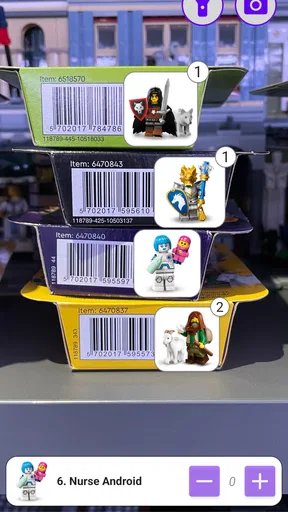
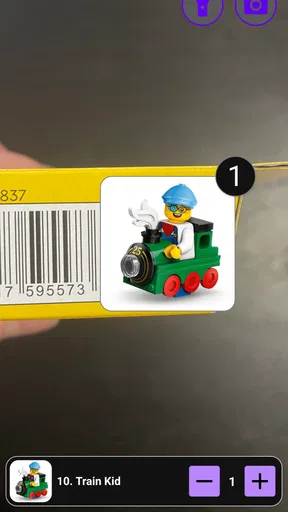
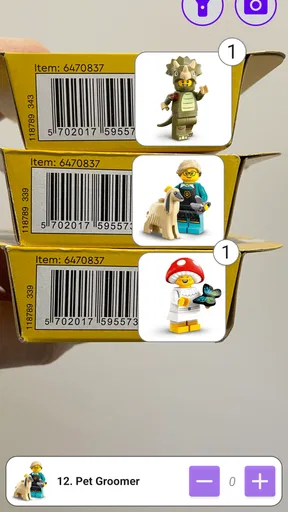
The app uses your phone’s camera to scan and identify Lego minifigures. The process is as simple as pointing your camera at the minifigure, and boom, the app does its magic. It identifies the minifigure and provides a detailed breakdown of what set it belongs to, its rarity, and even its estimated market value.
A Deep Dive into Features
One of the standout features of the app is its extensive database. The folks behind Minifig Scan have clearly put a lot of effort into cataloging thousands of figures. The app supports a vast array of minifigures from different series and sets, making it a powerful tool for collectors and casual fans alike.
But it doesn’t stop there. The app provides a history of each figure, sharing when it was released and in which set it was included. It’s like a trip down memory lane for those who’ve been collecting Legos since childhood.
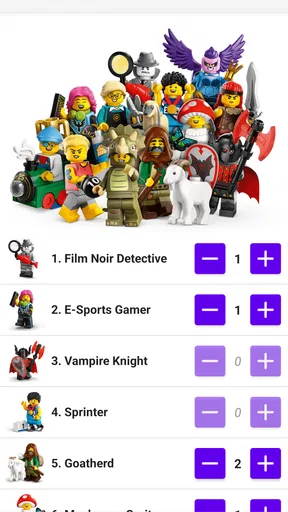
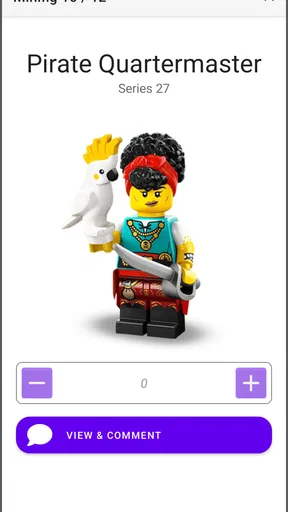
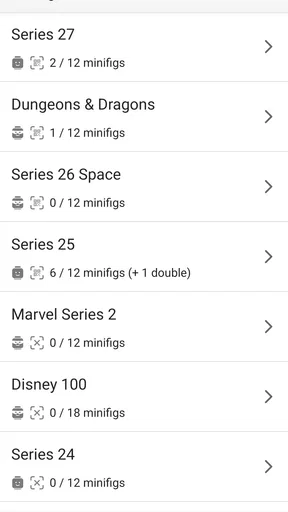
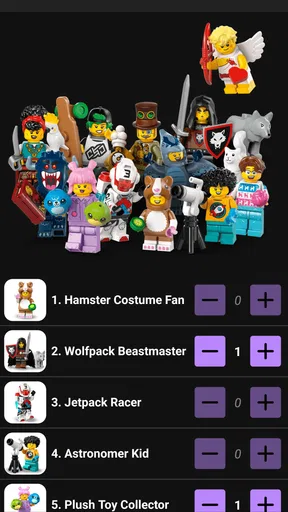
Another neat feature is the wishlist and collection tracker. You can easily add figures to your wishlist or mark them as part of your collection. This is perfect for keeping track of what you have and what you’re still hunting for. Plus, it syncs across devices, so you’re always up to date.
How Does It Perform?
Performance-wise, the app is pretty solid. I found that the scanning feature works best in good lighting, which is pretty standard for most camera-based apps. The recognition is impressively accurate, rarely missing a beat even with some of the more obscure figures.
One thing to note, though, is that while the app is comprehensive, it’s not entirely foolproof. There were a couple of instances where a figure wasn’t recognized. However, the app allows you to manually search and add figures, which is a handy workaround.
Community and Social Features
Minifig Scan also has a social aspect. You can connect with other users, share your collection, and even trade or sell figures. It’s like a mini social network for Lego enthusiasts. The community is buzzing with activity, and it’s a great place to get tips or just geek out over your favorite sets.
There’s also a forum where users can discuss all things Lego. Whether it’s building tips, set reviews, or just sharing your latest creations, there’s a place for you in the Minifig Scan community.
Final Thoughts
Overall, Minifig Scan is a must-have app for anyone passionate about Legos. Its seamless scanning feature, comprehensive database, and user-friendly interface make it a joy to use. While it’s not without its minor hiccups, the pros definitely outweigh the cons.
So, if you’ve got a collection of minifigures begging to be organized, or if you’re just looking to dive deeper into the Lego world, give Minifig Scan a try. It’s like having a Lego guru in your pocket, ready to enlighten you about every little figure you've got.
Pros
- Easy to use with intuitive controls.
- High-quality 3D model rendering.
- Regular updates with new features.
- Compatible with most devices.
- No intrusive ads during use.
Cons
- Limited model customization options.
- Requires stable internet connection.
- Occasional app crashes reported.
- Lacks offline scanning capabilities.
- Some features locked behind paywall.
FAQs for Minifig Scan
What is Minifig Scan and how does it work?
Minifig Scan is an innovative app designed to help users identify and catalog their LEGO minifigure collections. By using your device’s camera, the app scans your minifigures and matches them to a comprehensive database, providing detailed information on each character. It’s perfect for collectors and LEGO enthusiasts looking to organize and explore their collections.
Is Minifig Scan available on both Android and iOS devices?
Yes, Minifig Scan is available for download on both Android and iOS platforms. You can find it on the Google Play Store for Android devices and the Apple App Store for iOS devices. Ensure that your device meets the minimum system requirements for optimal performance.
Does Minifig Scan require an internet connection to function?
Minifig Scan requires an internet connection to access its extensive database and provide accurate identification results. While some features may work offline, an internet connection ensures you receive the latest updates and information on newly released minifigures.
Are there any in-app purchases or subscriptions in Minifig Scan?
Minifig Scan offers a free version with basic features. However, for a more enhanced experience, including access to exclusive content and advanced cataloging options, users can opt for in-app purchases or a subscription. This allows the app to continually update and improve its services.
How accurate is Minifig Scan in identifying LEGO minifigures?
Minifig Scan boasts a high accuracy rate in identifying LEGO minifigures, thanks to its large and regularly updated database. However, lighting conditions and the condition of the minifigure can impact results. For best accuracy, ensure good lighting and that the minifigures are clean and unobstructed during scanning.


